Case study 02 / Mobile product engineering
Crumbs
recipes, gathered.
From scattered recipe saves to a shared household system
Crumbs is a mobile recipe app built around a problem I kept having at home: recipes ended up scattered across screenshots, Instagram saves, browser tabs, messages and cookbooks, and finding the one I remembered was often harder than it should be.
I built it around three jobs: capture recipes wherever they turn up, make them easy to find again, and turn the recipes we choose into a shared shopping list.
It has grown into a shared household product with offline behaviour and real-time updates between devices. AI is used for one specific job: turning messy recipe sources into structured data that can be reviewed and edited before saving.
- Role
- Product & Mobile Engineer
- Context
- Independent household product
- Stack
- Flutter · Dart · Supabase/Postgres · Supabase Realtime · Edge Functions · SQLite · Anthropic API
01 / The problem
Making it easier to answer “what are we eating?”
I had recipes everywhere: screenshots, links, cookbooks, ChatGPT conversations, pieces of paper and things I had saved months earlier and could no longer find.
Even recipes I knew I loved could disappear into that mess. I have a favourite Black Forest cake I make for birthdays and somehow still end up hunting for the recipe every time.
But finding recipes was only part of the problem.
Planning meals for the week was surprisingly hard too. We would often think as far as the next dinner, buy food for that, then realise later that we had not planned much beyond it. That meant extra trips to the shop, forgotten ingredients, or getting hungry and discovering we had nothing obvious to turn into a proper meal.
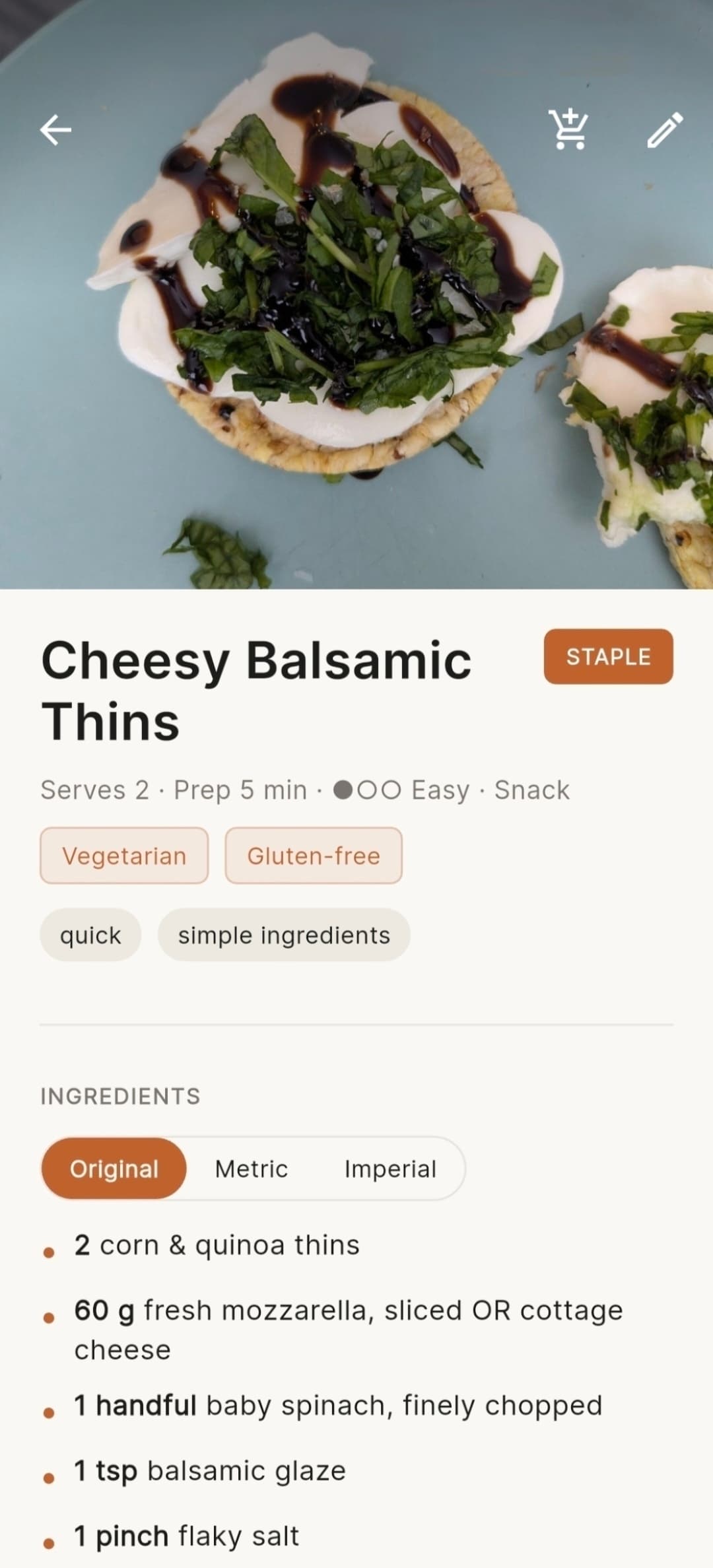
I wanted one place where we could see both recipes we wanted to try and the ordinary meals we already make all the time — fried rice, omelettes, pasta and other staples that do not really need a recipe.
It also needed to remember useful household context: whether we had made something before and how different members of the household rated it.
So Crumbs grew around three connected jobs:
- capture recipes wherever I find them and be able to find them again
- make choosing meals for the week much easier
- turn those choices into a useful shopping list in a few moments
The point was not to build a recipe catalogue. It was to make it easier to keep the house stocked for meals we actually wanted to cook.
02 / Designing the core loop
From saved recipe to dinner plan
The library is the starting point, but the product is really about what happens after a recipe is saved.
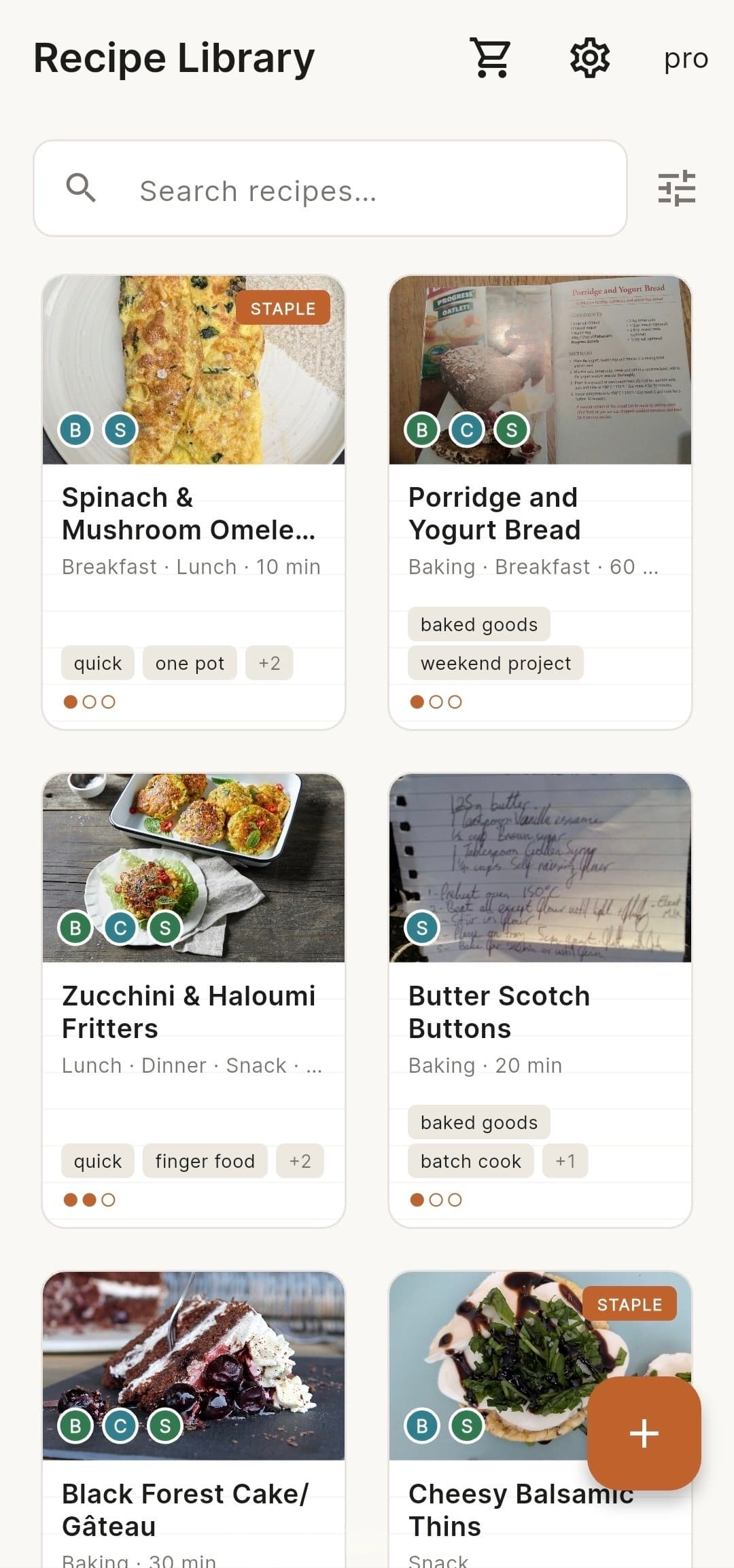
Opening Crumbs takes the household straight to the collection rather than through a separate dashboard. Recipes we want to try can sit alongside the meals we already know and make regularly, so deciding what to eat does not have to start from a blank page every week.
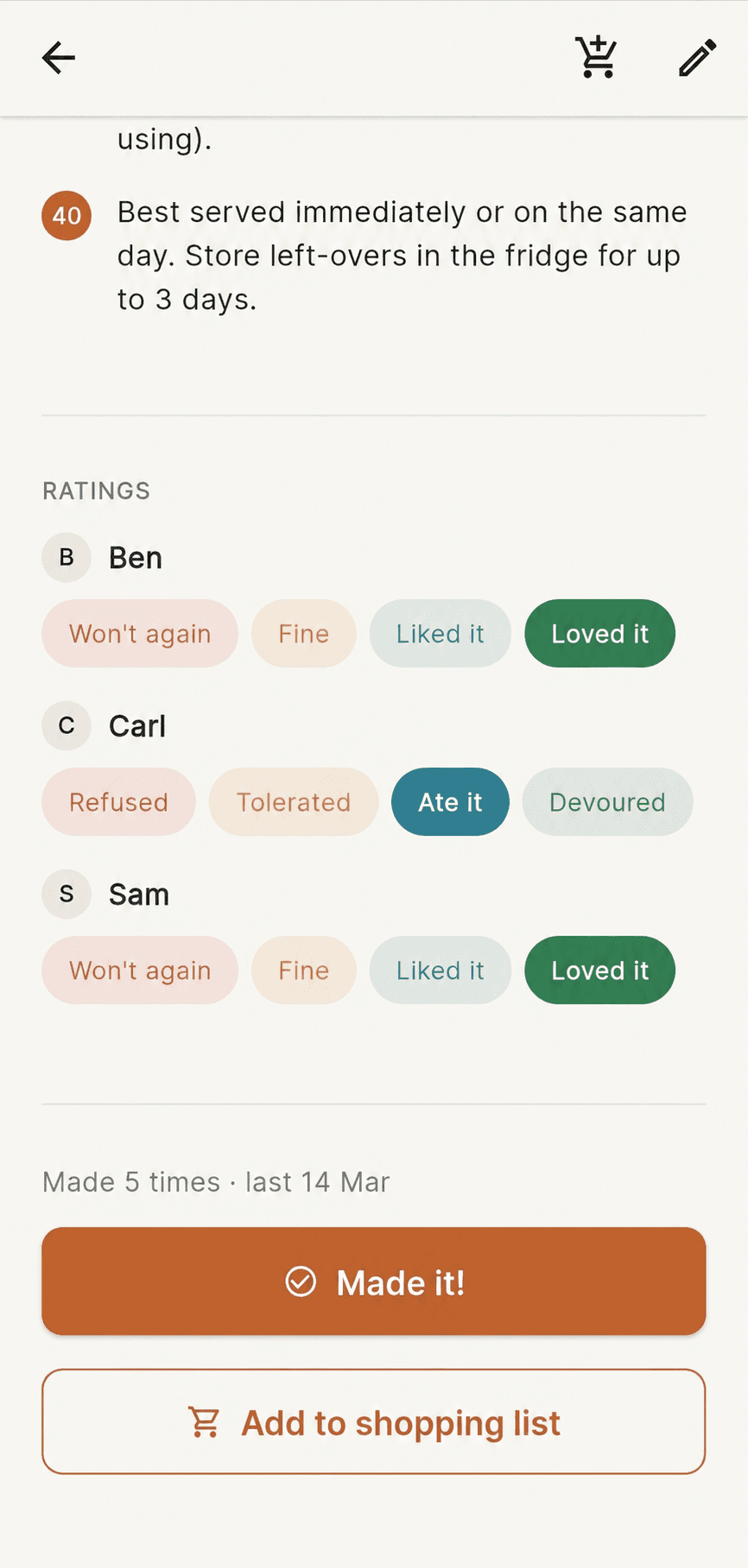
As recipes get used, they pick up useful context. They can be searched, filtered and sorted, rated separately by different household members, marked as made, tracked by cook count and last-made date, or kept as staples.
The library is shared, but not everything needs one household-wide answer. Different people can rate the same recipe separately, while cooking history and staples show whether something has actually become part of our regular rotation.
That makes the next decision easier too: what have we saved, what did we actually like, and what have we not made for a while?
The core loop is:
Capture → Find → Choose meals → Shop → Cook → Remember what worked ↺
Each part of the app feeds the next decision instead of ending at “recipe saved”.
03 / Capturing recipes
Getting recipes into one place
If adding a recipe meant manually copying every ingredient and instruction, I knew I would stop doing it.
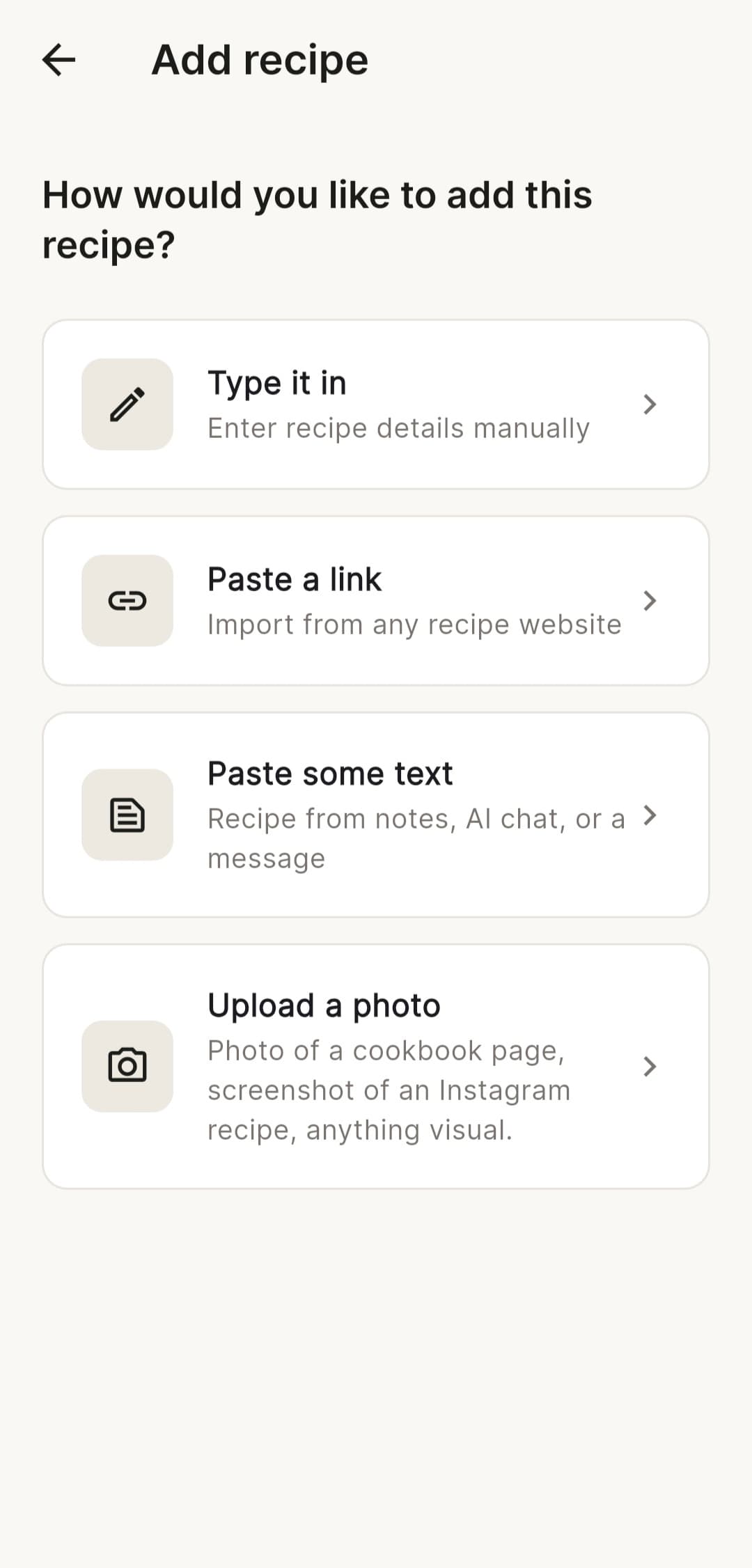
Crumbs supports a few different ways to get a recipe into the library:
- URL — paste a recipe link or share it directly from another app
- Image — import screenshots, photos or cookbook pages
- Text — paste recipe content from a message, note or AI conversation
- Manual — enter it directly when there is nothing useful to extract
Recipes can also be sent straight to Crumbs through the system share menu. Shared URLs go into URL import, text into text import and images into image import.
If something arrives while the app is still starting or signing in, it is queued until the library is ready rather than being lost.
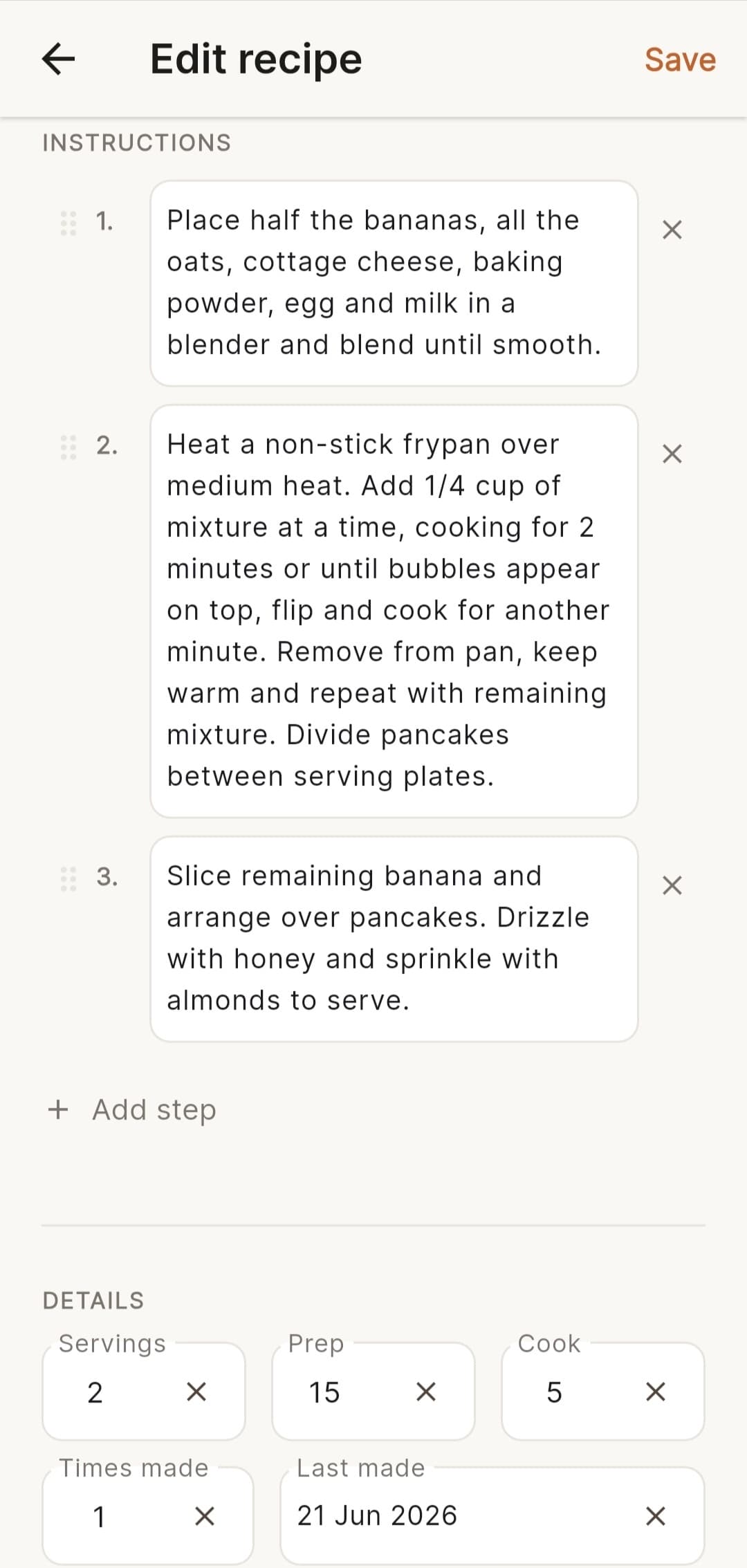
Whatever the source, the extracted result is only a draft. The user can review and edit the title, ingredients, instructions, timings, tags and other details before it becomes a saved recipe.
That was important: extraction should remove the tedious part of capture without taking control of the recipe data away from the person saving it.
Share from another app → same URL / text / image import path
04 / Using AI for extraction
Using AI only where it helps
AI has a narrow role in Crumbs: interpreting recipe content. It turns messy recipe sources into structured data and can suggest useful metadata such as tags or recipe attributes, all of which remain reviewable before saving.
For recipe URLs, the backend first checks for existing schema.org/Recipe data. If the site has already provided usable structured data, Crumbs uses that instead of making a model call.
If that data is missing, the URL can fall back to model-assisted extraction. Images and pasted text use the same server-side extraction approach because they start out genuinely unstructured. Anthropic credentials stay inside Supabase Edge Functions rather than being shipped with the Flutter app.
AI does not control the rest of the product:
- search and filtering
- ratings or cooking history
- staples
- shopping-list categorisation or ingredient merging
- household synchronisation
Those are normal software problems and stay normal software.
That boundary matters for cost too. The non-AI parts of the household product remain usable without paid model calls, while AI-assisted extraction can sit behind the Pro tier that covers its running cost.
The rule is simple: use AI when it saves tedious transcription or interpretation work, and ordinary software when the behaviour can be deterministic.
05 / Building the shopping list
Making the shopping list work in real use
The shopping list had to be at least as easy to add to as the shared Google Keep list we were already using. If adding a quick item took more effort than typing it and pressing enter, neither of us was going to use it.
But the simplest list view was not always the most useful one.
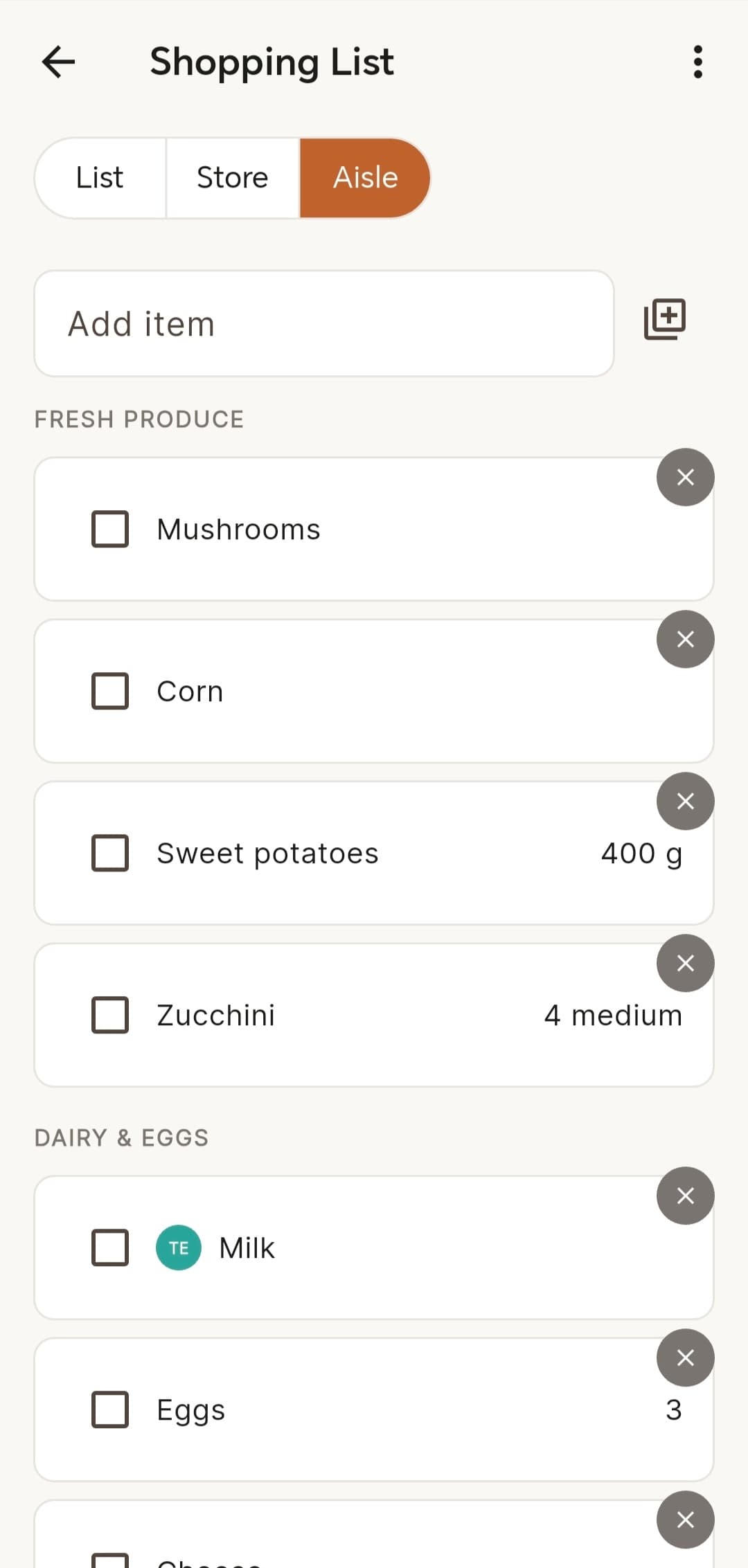
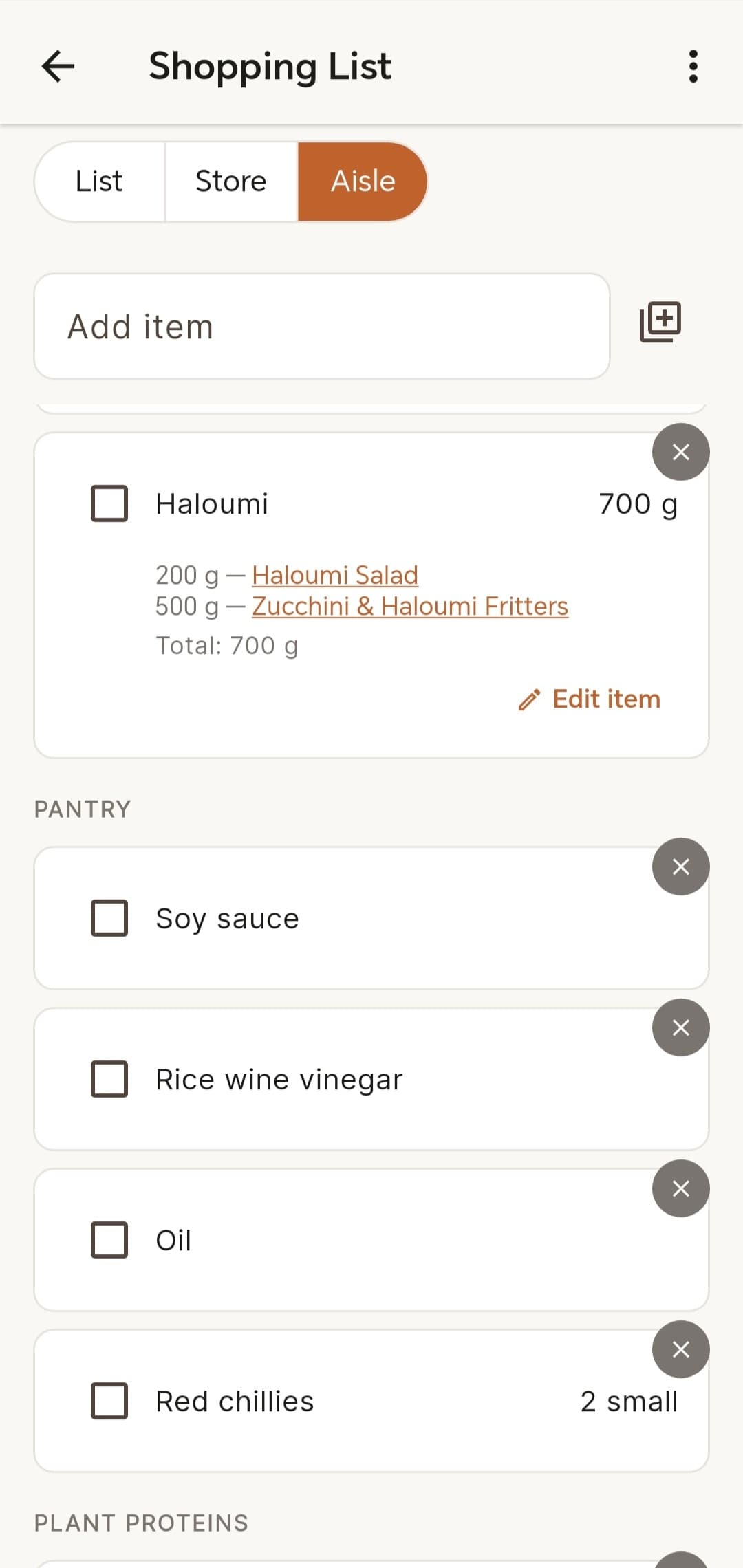
At the shop, grouping items by category makes it easier to move through the aisles without repeatedly doubling back. And while planning a shop, we sometimes need to know whether anything on the list can only be bought at a particular store.
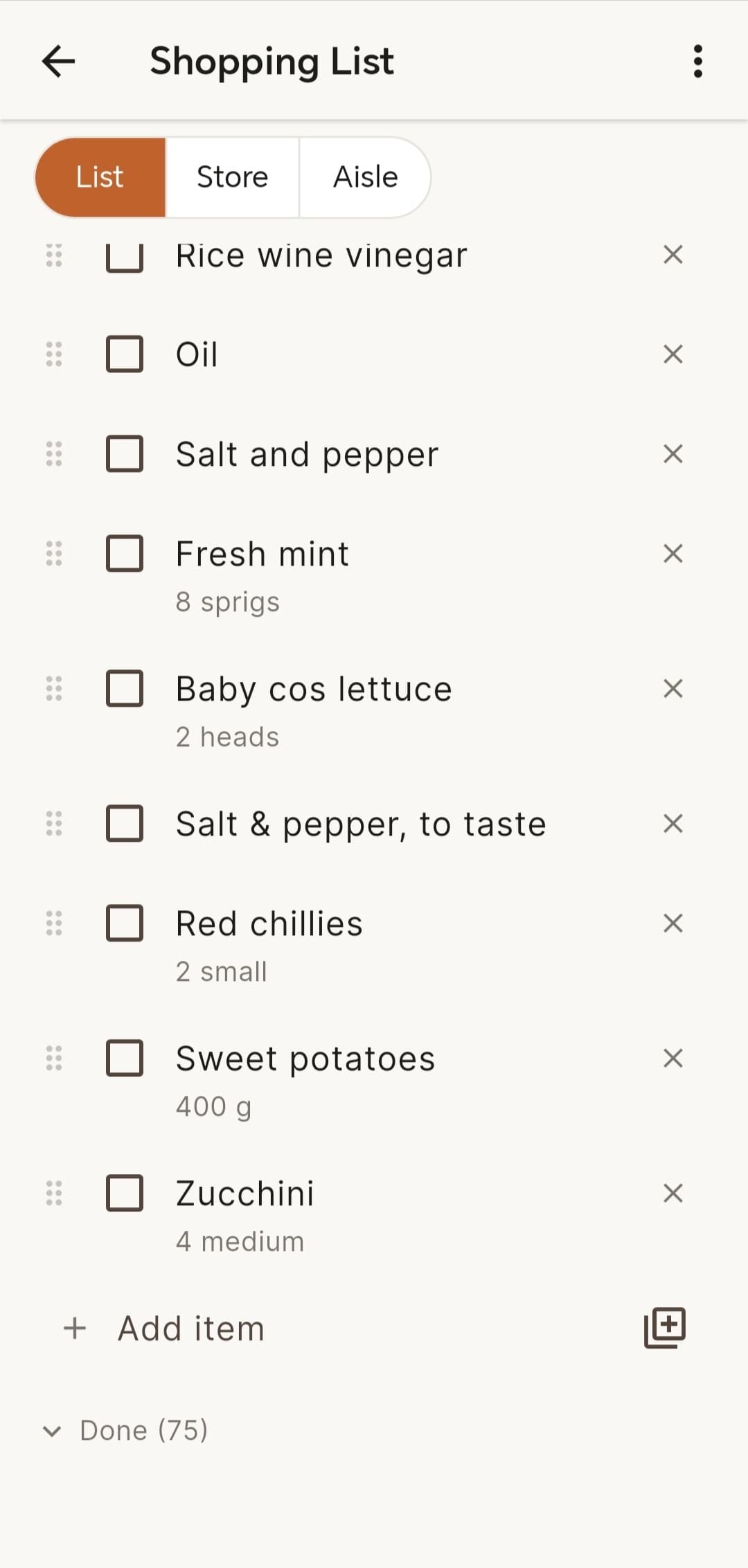
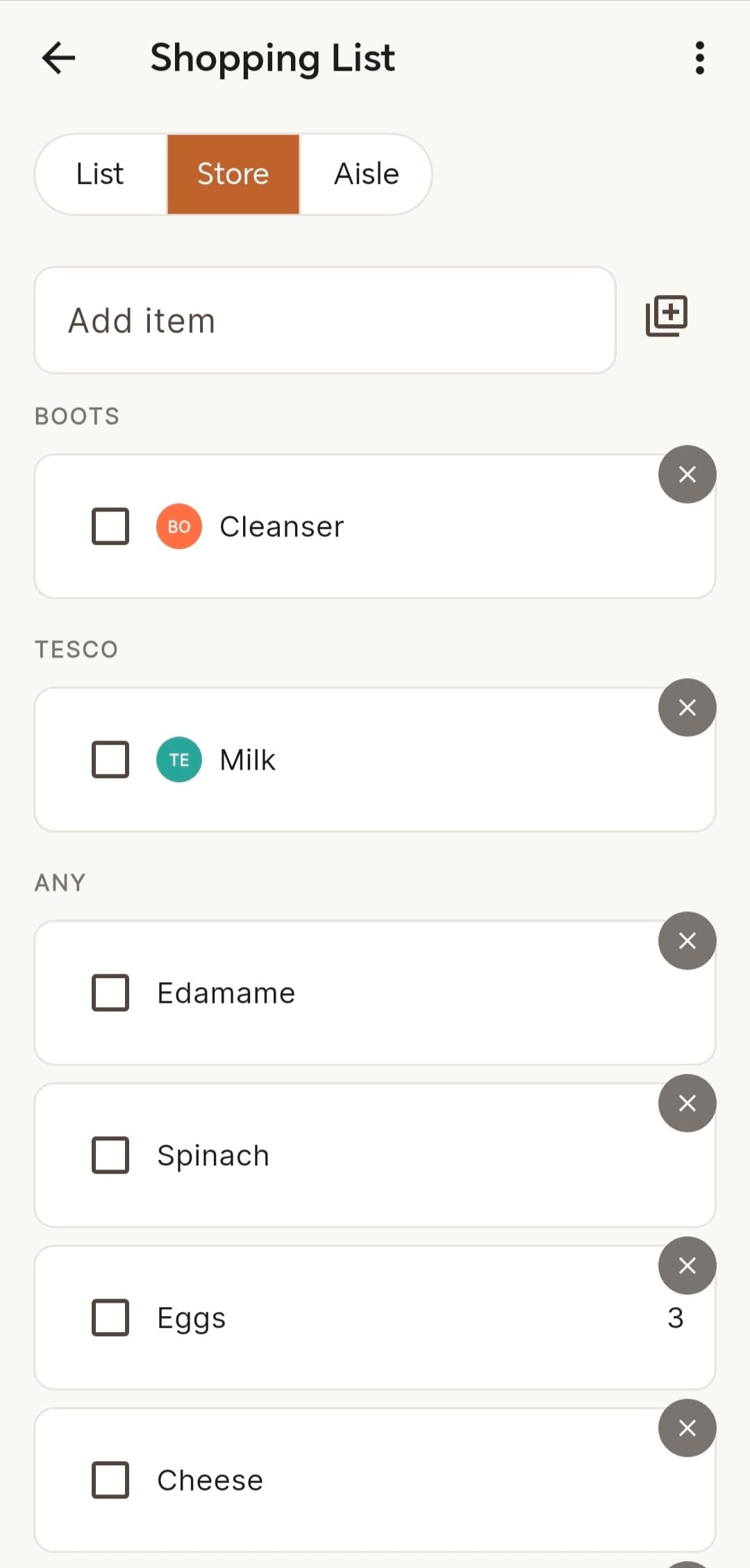
So the same shopping list can be viewed in three ways:
- List — quick entry and the simplest everyday view
- Category — grouped for moving through the shop more efficiently
- Store — shows which items need to come from a particular supermarket
The underlying list stays the same; the view changes depending on what we are trying to do.
Combining recipe ingredients
Turning a few chosen recipes into that list sounds simple until the same ingredient appears more than once, in different quantities or in different states.
Crumbs keeps the individual recipe contributions behind each merged shopping-list item rather than repeatedly combining already-formatted text. That means an existing 200g contribution and a new 100g contribution can be recalculated properly instead of gradually turning into an ambiguous display string.
There are also a few rules that only became obvious once I thought through how the list would actually be used:
- an active item wins over a completed item with the same name
- reactivating a completed recipe item starts from the new contribution rather than quantities already bought
- manually adding something that is already active does not create a duplicate
- categorisation and ingredient merging stay deterministic rather than becoming AI calls
The merge logic is planned separately from persistence, which makes those rules testable without involving Flutter or Supabase.
Review caught a retry problem
The first persistence path wrote the inserts and updates for a recipe merge individually.
An independent review caught a failure case: if the first ingredient was written successfully and a later write failed, retrying from the unchanged screen could write the successful ingredient again and create a duplicate.
I moved the merge into a Postgres RPC that applies the whole plan inside one transaction. Either the full merge succeeds or none of it is written, so retrying is safe.
It was a useful example of something that looked fine on the happy path but needed a different implementation once failure and retry were taken seriously.
06 / Working offline
Keeping the list usable when the connection isn't
A shopping list is a particularly bad place to depend on a perfect network connection. If the app becomes useless in a supermarket with poor signal, it has failed at exactly the moment it is supposed to help.
Crumbs keeps a local SQLite cache and a queue of writes that have not yet reached Supabase. If a network read fails, the app can fall back to the cached data and queued changes can be synchronised later.
Network calls are also time-bounded so a bad connection does not leave the app waiting indefinitely before switching to the local path.
I kept the conflict handling fairly simple for the current household use. If the same data is edited concurrently, the latest write wins rather than trying to merge both versions automatically.
That is a trade-off I am comfortable with for the MVP. A more complicated conflict model would only be worth adding if real use showed that simultaneous edits were causing meaningful problems.
07 / AI-assisted engineering
Building with AI in an unfamiliar stack
Crumbs was partly an experiment in a different way of building.
Flutter is not one of my established development stacks. I wanted to see how far I could take a product I had designed by using AI for much of the implementation while I kept control of the product decisions, requirements and acceptance of the work.
I kept a written product and technical specification as the source of truth and worked in small enough steps that each piece could be planned, built and checked against it.
The workflow was:
Specification → Plan → Build → Independent review → Correction
Claude was used in the planning and implementation loop. A separate Codex review checked the completed work against the specification, schema, tests and project rules without authority to change the implementation itself.
That review found problems the happy path did not. During URL import, for example, the extractor could parse a model response as valid JSON while still accepting recipe data that did not satisfy the product's expected structure. The implementation was tightened so extracted content had to pass the product's normalisation and validation rules before becoming a recipe draft.
Other reviews caught inconsistent import rules, silently dropped shared images and the unsafe shopping-list retry path described earlier.
Defining what counted as done
Pure logic needed unit tests, stateful UI needed a widget test covering its main path, static analysis had to pass and the full Flutter test suite had to stay green. Anthropic is mocked in automated tests, with separate tests for the backend extraction paths and CI running the checks again on pushes and pull requests.
AI-assisted code did not get a different definition of done.
The useful part of the experiment was not simply getting AI to write Flutter code. It was finding a way to keep implementation in an unfamiliar stack constrained by requirements, tests, independent review and my own acceptance of the result.
08 / Current state
What is working now
Crumbs is a functioning MVP in regular household use.
The main product loops are in place:
Capture
URL · image · pasted text · manual entry · system sharing
Find
search · filters · sorting · tags
Use
ratings · Made it · cooking history · staples
Plan
meal selection · ingredient merging · shared shopping list
Underneath that are household accounts, Supabase/Postgres, real-time shopping-list updates, local SQLite caching, queued writes and synchronisation.
Crumbs uses a cross-platform Flutter codebase. Native sharing is currently implemented and tested on Android; the equivalent iOS share extension still needs its platform-specific implementation.
There are still MVP trade-offs. Concurrent edits use last-write-wins, and there are parts of the household and meal-planning experience I would continue refining through use.
The useful test is still the original one: does it make it easier to find recipes again, decide what to cook and get from those decisions to a shopping list quickly?
09 / Reflection
The useful part was connecting the pieces
A simple recipe library would have solved the first problem I had: somewhere to put recipes so I could find them again.
Crumbs became much more useful once the rest of the household loop connected to that.
A screenshot or link can become an editable recipe. That recipe can become something we cook, rate and remember. Recipes and everyday staple meals can become a plan for the week, and that plan can become a shared shopping list without starting again from scratch.
Each connection introduced a different kind of problem behind what initially looked like a fairly simple app: extraction, shared state, offline behaviour, ingredient merging, household preferences and safe retry behaviour.
That is what made the project interesting to build. The value was not in any one feature, but in making the whole path from “I want to try that” to “we have what we need for dinner” easier.